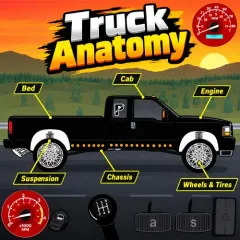
Introduction to Truck Anatomy
Truck Anatomy is an interactive vehicle simulation that emphasises exploration and knowledge instead than speed and competitiveness. Players can view realistic models of the trucks, see through views to view internal parts, start the engine, change gears and drive around in a basic surroundings. Real engine sounds and hover-based stats add depth to the learning experience. Part of the community-driven Car Anatomy² series, it features many remixes centered on American trucks.
Gameplay Guide for Truck Anatomy
Load the project and begin by starting the engine. Shift into gear and move the vehicle while switching to see-through views for closer inspection of components. Hover over parts to reveal performance details. Some versions also allow opening doors or the hood. The focus remains on observation and controlled operation rather than timed challenges.
Vehicle Specs
1996 Ford F-250 Lariat Heavy Duty Turbo Diesel
- Engine: 7.3L (444cid) Powerstroke V8 with direct injection
- Power: 275 horsepower and 545 ft-lb of torque (turbocharged)
- Mass: 2873 kg (6334 lbs) with front differential and ZF5 transmission
2004 Ford Crown Victoria P71 (Ex-Interceptor)
- Engine: 4.6L (281cid) V8 with heavy-duty alternator
- Power: 252 horsepower and 265 ft-lb of torque
- Mass: 1840 kg (4057 lbs)
Game Controls
- Turn the key or press Q to start the engine
- D to accelerate and S to decelerate (controls reverse when in Reverse)
- W and E keys or gear shift to select gears (start in 1st or 2nd)
- A for the clutch (required to change gears)
- Drive faster and shift into higher gears as you go
- Click and drag to move the perspective
What Make Truck Anatomy So Thrilling
- Detailed Models 1996 Ford F-250 Lariat Heavy Duty Turbo Diesel 2004 Ford Crown Victoria P71
- See-through mode to analyse the engine, drivetrain and systems
- Interactive engine starting, gear shifting, and basic driving
- Realistic vehicle sounds
- Hover-over stats and variables for educational insight
- Community remixes of popular truck variants
Tips for Exploring Truck Anatomy
- Activate see-through mode early to map internal systems.
- Practice smooth shifting and good clutch use for greater control.
- Click and drag to rotate the vehicle and see it from other camera viewpoints.
- Take time hovering over parts instead of only driving.
Careful exploration turns every session into a clearer understanding of how these vehicles function. Load Truck Anatomy on Scratch and discover what lies under the body panels.